auto-jrubby is a Typst package that provides automatic Japanese morphological analysis and furigana (ruby) insertion.
It leverages a Rust-based WASM plugin to tokenize text using Lindera (a morphological analysis library) and uses the rubby package to render the furigana.
Features
- Automatic Furigana Generation: Automatically determines readings for Kanji based on context and renders them as ruby text.
- Smart Okurigana Alignment: Intelligent handling of mixed Kanji/Hiragana words (e.g.,
食べるis rendered with rubyたover食, leavingべるuntouched). - Morphological Analysis Table: Visualize the text structure (Part of Speech, Detailed POS, Readings, Base forms) via a formatted data table.
- Customizable Styling: Supports custom ruby sizing and positioning via the
rubbypackage backend. - Flexible Script Output: Choose between Hiragana (default) or Katakana for the ruby text.
- High Performance: Powered by a Rust WASM plugin using Lindera for fast and accurate tokenization.
Usage
Basic Furigana
To automatically add readings to Japanese text:
#import "@preview/auto-jrubby:0.3.4": *
#set page(width: auto, height: auto, margin: 0.5cm)
#set text(font: "Hiragino Sans", lang: "ja")

#let sample = "東京スカイツリーの最寄り駅はとうきょうスカイツリー駅です"
#show-ruby(sample)
Morphological Analysis Table
To debug or display the linguistic structure of the text:
#import "@preview/auto-jrubby:0.3.4": *
#set page(width: auto, height: auto, margin: 0.5cm)
#set text(font: "Hiragino Sans", lang: "ja")

#let sample = "東京スカイツリーの最寄り駅はとうきょうスカイツリー駅です"
#show-analysis-table(sample)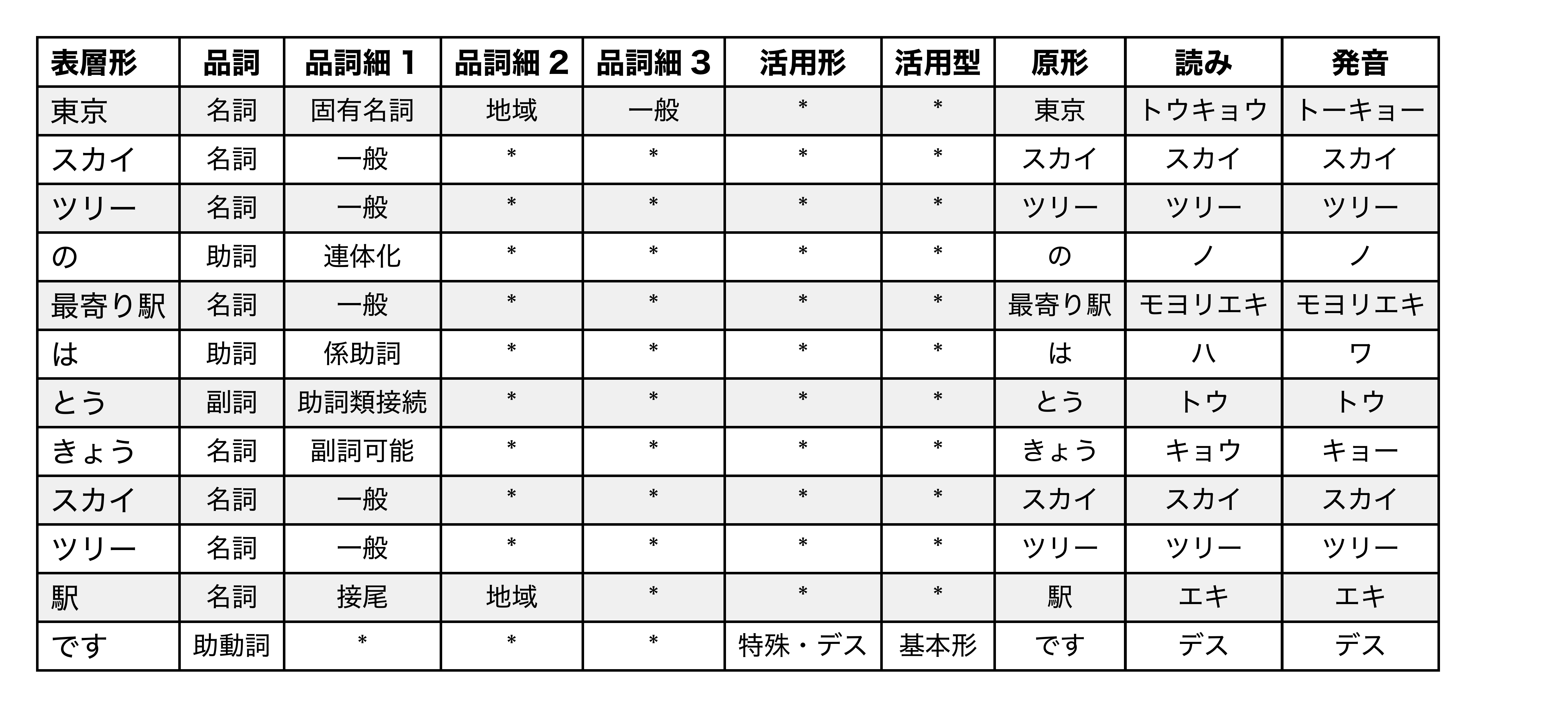
Kana Selection
You can choose to output ruby in Hiragana (default) or Katakana:
#import "@preview/auto-jrubby:0.3.4": *
#set page(width: auto, height: auto, margin: 0.5cm)

#let sample = "東京スカイツリーの高さは634mです"

// Default (Hiragana)
#show-ruby(sample)
// Katakana
#show-ruby(sample, kana: "katakana")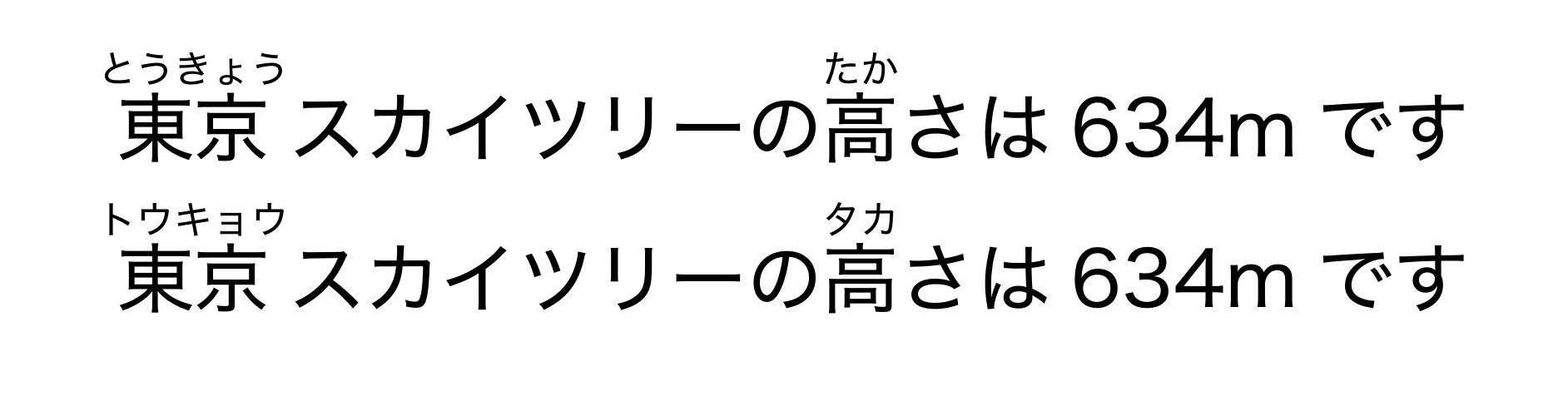
API Reference
show-ruby
Renders the input text with automatic furigana.
#show-ruby(
  input-text,
  size: 0.5em,
  leading: 1.5em,
  ruby-func: auto,
  user-dict: none,
  dict: "ipadic",
  kana: "hiragana"
)
Parameters:
input-text(string): The Japanese text to analyze and render.size(length): The font size of the ruby text. Defaults to0.5em.leading(length): The vertical space between lines to accommodate ruby text. Defaults to1.5em.ruby-func(function | auto): A custom ruby function from therubbypackage.- If
auto, it uses the default configuration (get-ruby(size: size)). - If provided, it allows advanced customization of ruby positioning (e.g., specific
posoralignment). user-dict(string | array | none): Optional user dictionary for custom tokenization.- If
string: A CSV-formatted string with custom dictionary entries. - If
array: An array of arrays, where each inner array represents a CSV row. - If
none: No user dictionary is used. dict(string): The dictionary to use for tokenization. Must be one of:"ipadic"(default): Standard Japanese dictionary"unidic": Alternative dictionary with different grammatical analysiskana(string): The script to use for the ruby text. Must be one of:"hiragana"(default): Converts dictionary readings to Hiragana."katakana": Uses Katakana readings.
show-analysis-table
Renders a table displaying the morphological breakdown of the text.
#show-analysis-table(
  input-text,
  user-dict: none,
  dict: "ipadic"
)
Parameters:
input-text(string): The text to analyze.user-dict(string | array | none): Optional user dictionary for custom tokenization.dict(string): The dictionary to use. Must be one of:"ipadic"(default) or"unidic".
Table Columns:
The columns displayed depend on the selected dict.
If dict: "ipadic" (10 columns):
- Surface Form (表層形): The word as it appears in the text.
- Part of Speech (品詞): Grammatical category (Noun, Verb, etc.).
- POS Subcategory 1 (品詞細分類1)
- POS Subcategory 2 (品詞細分類2)
- POS Subcategory 3 (品詞細分類3)
- Conjugation Form (活用形)
- Conjugation Type (活用型)
- Base Form (原形): The dictionary form of the word.
- Reading (読み): Katakana reading.
- Pronunciation (発音)
If dict: "unidic" (18 columns):
- Surface Form (表層形)
- POS Major (品詞大分類)
- POS Medium (品詞中分類)
- POS Minor (品詞小分類)
- POS Fine (品詞細分類)
- Conjugation Type (活用型)
- Conjugation Form (活用形)
- Lexeme Reading (語彙素読み)
- Lexeme (語彙素)
- Orthographic Surface (書字形出現形)
- Phonological Surface (発音形出現形)
- Orthographic Base (書字形基本形)
- Phonological Base (発音形基本形)
- Word Type (語種)
- Initial Mutation Type (語頭変化型)
- Initial Mutation Form (語頭変化形)
- Final Mutation Type (語末変化型)
- Final Mutation Form (語末変化形)
tokenize
Low-level function that returns the raw JSON data from the WASM plugin. Useful if you want to process the analysis data manually.
#tokenize(
  input-text,
  user-dict: none,
  dict: "ipadic"
)
Parameters:
input-text(string): The text to tokenize.user-dict(string | array | none): Optional user dictionary for custom tokenization.dict(string): The dictionary to use. Must be one of:"ipadic"or"unidic".
Returns: An array of dictionaries containing:
surface(string): The surface form of the token.details(array of strings): The raw detailed information for the token. The content and length depend on the dictionary used (e.g., POS, conjugation, reading, etc.).ruby_segments(array of dictionaries): A pre-calculated list of segments for furigana, where each item hastextandrubyfields.
User Dictionary Format
The user dictionary allows you to define custom word segmentation and readings. It uses a simple CSV format with three columns:
<surface>,<part_of_speech>,<reading>surface: The word as it appears in textpart_of_speech: Custom part-of-speech label (e.g., “カスタム名詞”)reading: Katakana reading for the word
Usage Examples:
Method 1: Inline string
#let sample = "東京タワーの最寄駅は赤羽橋駅です"
#let user-dict-str = "赤羽橋駅,カスタム名詞,アカバネバシエキ"

#show-ruby(sample)
#show-ruby(sample, user-dict: user-dict-str)
Method 2: Array of arrays
#let sample = "東京タワーの最寄駅は赤羽橋駅です"
#let user-dict-array = (
  ("赤羽橋駅", "カスタム名詞", "アカバネバシエキ")
)

#show-ruby(sample)
#show-ruby(sample, user-dict: user-dict-array)
Method 3: Load from CSV file
$ cat user_dict.csv
赤羽橋駅,カスタム名詞,アカバネバシエキ
#let sample = "東京タワーの最寄駅は赤羽橋駅です"
#let user-dict-from-file = csv("user_dict.csv")
#show-ruby(sample)
#show-ruby(sample, user-dict: user-dict-from-file)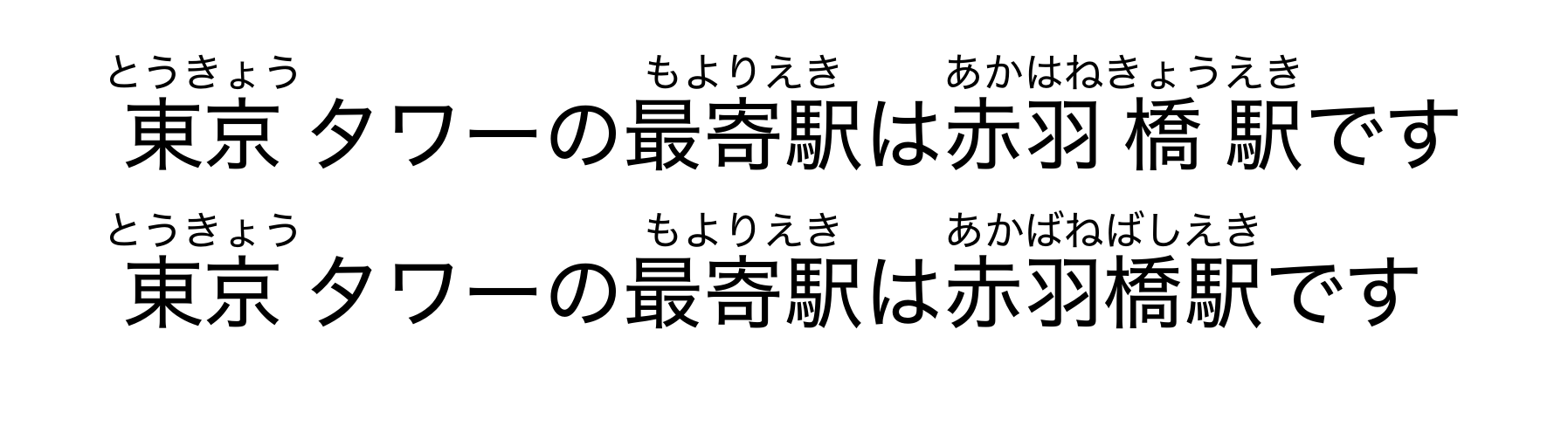
Under the Hood
This package uses Lindera (a Rust port of Kuromoji) with two available dictionary options:
- IPADIC: Standard Japanese morphological dictionary
- UniDic: Alternative dictionary with different part-of-speech classifications
The processing workflow:
- The text is passed from Typst to the Rust WASM plugin.
- Lindera tokenizes the text using the specified dictionary and retrieves readings.
- A custom algorithm aligns the readings with the surface form to separate okurigana (kana endings of verbs/adjectives) from the kanji stems.
- The structured data is returned to Typst and rendered using the
rubbypackage for furigana display.
Optional: Enabling IPADIC-NEologd
IPADIC-NEologd Support
IPADIC-NEologd (an extended dictionary with contemporary terms and named entities) has been removed from the default distribution due to its large file size. However, you can manually enable it if needed:
- Navigate to
./wasm-plugins/ipadic-neologdand build the WASM module:cargo build --target wasm32-unknown-unknown --release - Copy the built WASM file to the package directory:
cp ./target/wasm32-unknown-unknown/release/ipadic_neologd.wasm ../../package/ipadic_neologd.wasm - Navigate to
./packageand update./package/lib.typto allow theipadic-neologdoption. Change:
to:if dict not in ("ipadic", "unidic") { panic("dict must be one of: ipadic, unidic") }if dict not in ("ipadic", "ipadic-neologd", "unidic") { panic("dict must be one of: ipadic, ipadic-neologd, unidic") } - Install the package locally:
just install - Import and use with
@local:#import "@local/auto-jrubby:0.3.3": * #let sample = "東京スカイツリーの最寄り駅はとうきょうスカイツリー駅です" #show-ruby(sample, dict: "ipadic-neologd")
License
This project is distributed under the AGPL-3.0-or-later License. See LICENSE for details.