molchemist renders chemical structures in Typst from Molfile/SDF data or SMILES. It preserves usable input coordinates and uses a Rust/WASM layout plugin when a 2D layout must be generated.
Molfile/SDF parsing is powered by sdfrust, SMILES parsing by opensmiles, SMILES and fallback SDF 2D coordinate generation by CoordgenLibs, and final Typst drawing by alchemist. The Rust/WASM components connect these libraries and preserve chemical semantics across parsing, layout, and rendering.
Quick start
This SDF example uses the bundled PubChem record for CID 93406:
#import "@preview/molchemist:0.1.6": *

#let molecule = read("Structure2D_COMPOUND_CID_93406.sdf")
#render-mol(molecule, abbreviate: true)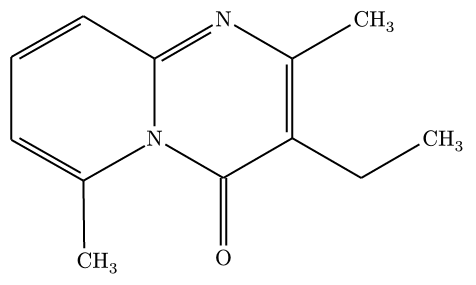
Source data: PubChem Compound CID 93406.
SMILES input uses the same renderer after generating a 2D layout. This example is melatonin (PubChem CID 896):
#render-smiles(
  "CC(=O)NCCC1=CNC2=C1C=C(C=C2)OC",
  abbreviate: true,
)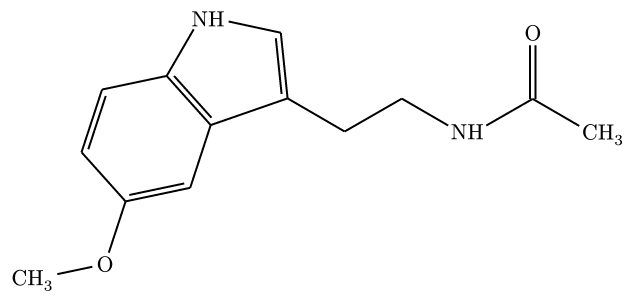
Source data: PubChem Compound CID 896.
render-mol accepts V2000/V3000 Molfile and multi-record SDF input. Its one-based record option selects an SDF record. Typst 0.15 or later can also pass a path(...) directly; read(...) remains portable across supported Typst versions.
Rendering modes
All three modes below use the bundled 2D SDF for benzene, PubChem CID 241:
#let benzene = read("Structure2D_COMPOUND_CID_241.sdf")

#grid(
  columns: 3,
  gutter: 8mm,
  align: center + horizon,
  render-mol(benzene),
  render-mol(benzene, abbreviate: true),
  render-mol(benzene, skeletal: true),
)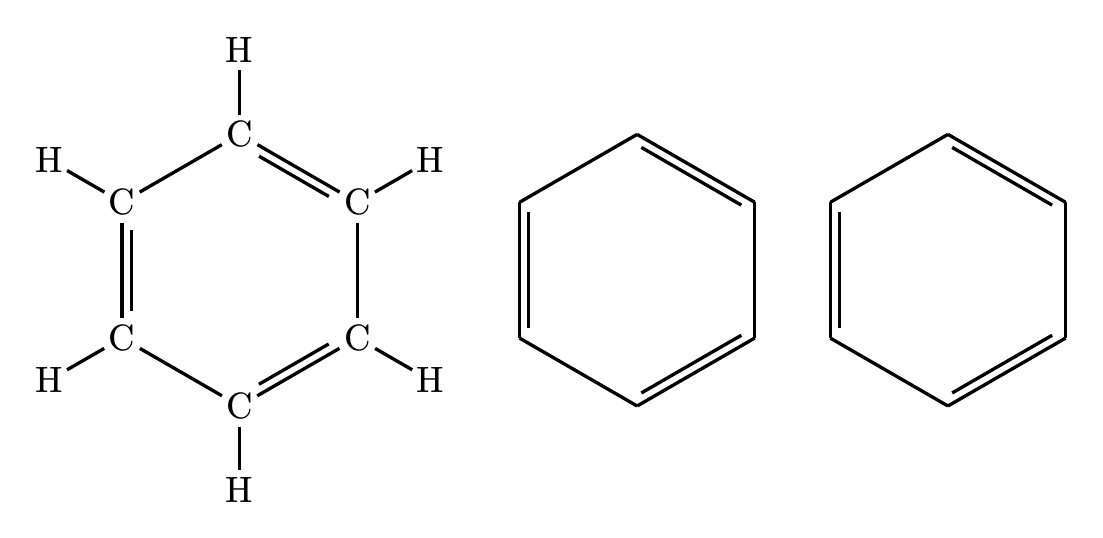
From left to right: full, abbreviated, and skeletal mode.
Source data: PubChem Compound CID 241.
Appearance is controlled through the config dictionary passed to Alchemist.
Layout, reactions, and R-groups
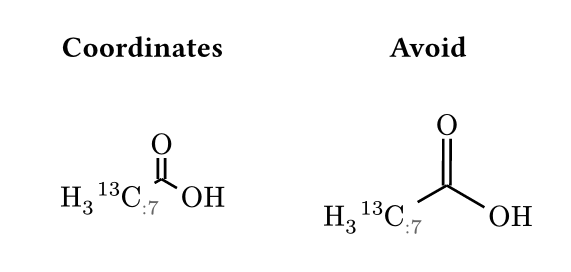
Coordinate spacing
The same isotope-labelled molecule is drawn at atom-sep: 1.2em in both panels. layout: "coordinates" retains the crowded spacing; the default "avoid" increases it to clear measured labels and retain visible bond lengths. layout: "reflow" additionally regenerates SDF coordinates.
#let molecule = "[13CH3:7]C(=O)O"
#context {
  let first = render-smiles(molecule, abbreviate: true,
    config: (layout: "coordinates", atom-sep: 1.2em))
  let second = render-smiles(molecule, abbreviate: true,
    config: (layout: "avoid", atom-sep: 1.2em))
  let first-width = measure(first).width
  let second-width = measure(second).width
  let width = calc.max(first-width, second-width)
  box(width: 2 * width + 10mm, {
    grid(columns: (width, width), column-gutter: 10mm, align: center,
      [*Coordinates*], [*Avoid*])
    v(3mm)
    h((width - first-width) / 2)
    first
    h(width - (first-width + second-width) / 2 + 10mm)
    second
    h((width - second-width) / 2)
  })
}
Reaction-center highlighting
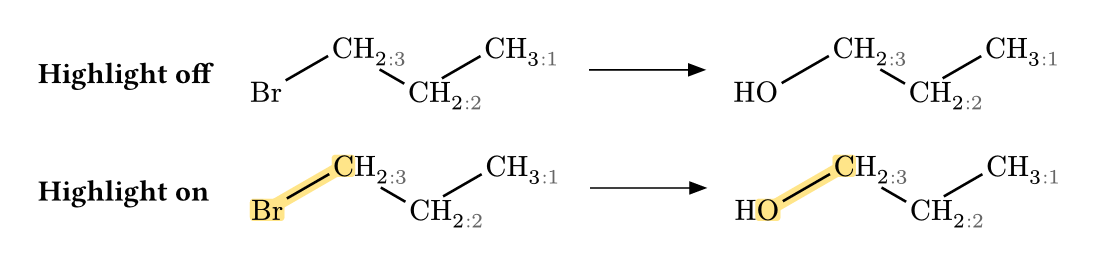
Both rows show 1-bromopropane becoming 1-propanol. Highlighting marks the broken C–Br bond and the formed C–O bond, plus their endpoint element symbols. Atom and bond backgrounds form continuous regions. The C–C backbone, hydrogen labels, and atom-map numbers remain unhighlighted. highlight-center switches this highlighting on or off.
#let reaction = "[CH3:1][CH2:2][CH2:3]Br>>[CH3:1][CH2:2][CH2:3]O"
#grid(
  columns: 2, column-gutter: 5mm, row-gutter: 6mm,
  align: (left + horizon, left + horizon),
  [*Highlight off*], render-reaction(reaction, highlight-center: false),
  [*Highlight on*], render-reaction(reaction, highlight-center: true),
)
R-group alternatives
The same RGfile supplies both panels: its root structure on the left, and the root plus methoxy/cyano alternatives, numbered attachment symbols, and readable occurrence conditions on the right.
#let data = read("rgroup-alternatives.mol")
#let groups = inspect-rgroup(data)
#let root = render-mol(groups.root, skeletal: true)
#let alternatives = render-rgroup(data)
#grid(
  columns: 2, gutter: 10mm, align: center + top,
  [*Root only* #v(3mm) #root],
  [*Root and alternatives* #v(3mm) #alternatives],
)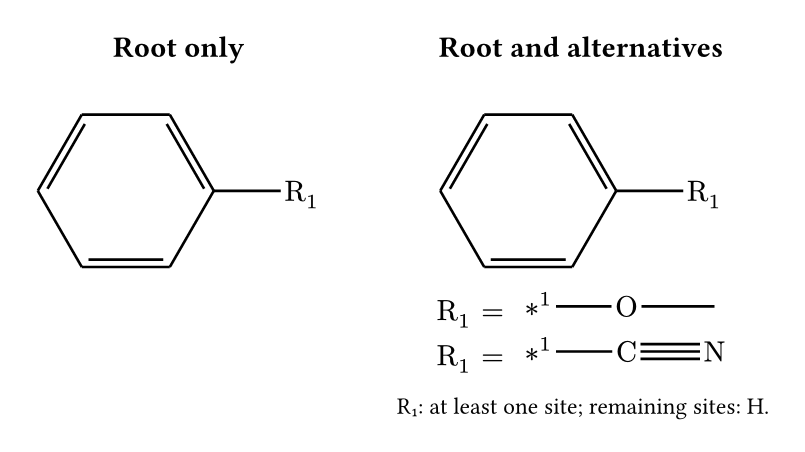
The R-group example uses the bundled synthetic RGfile. MOL2, RXN, optional atom correspondence, and 3D stereo projection are also supported; see the manual for their APIs and inference limits.
CTfile fidelity
This ACD/Labs fixture distributed by RDKit contains two multi-atom SUP SGroups. Both panels use the same record: the default contracts them to NO₂ and COOH, while sgroups: "expanded" displays their atoms and bonds, including the hydroxyl H inferred from ordinary valence. The two views share a scaffold baseline. inspect-mol retains the source semantics in either case.
#let data = read("Sgroups_Abbreviations.mol")
#context {
  let first = render-mol(data, skeletal: true, fidelity: "strict",
    config: (baseline-atom: "a0"))
  let second = render-mol(data, skeletal: true, fidelity: "strict",
    config: (sgroups: "expanded", baseline-atom: "a0"))
  let first-width = measure(first).width
  let second-width = measure(second).width
  let width = calc.max(first-width, second-width)
  box(width: 2 * width + 10mm, {
    grid(columns: (width, width), column-gutter: 10mm, align: center,
      [*Contracted*], [*Expanded*])
    v(3mm)
    h((width - first-width) / 2)
    first
    h(width - (first-width + second-width) / 2 + 10mm)
    second
    h((width - second-width) / 2)
  })
}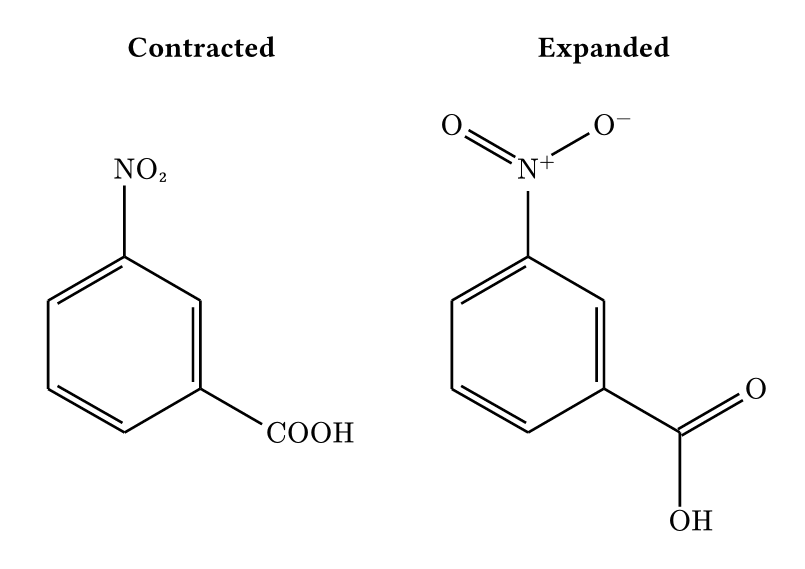
Source data: RDKit Sgroups_Abbreviations.mol. The bundled copy only normalizes CRLF line endings to LF.
The inspected record includes source IDs, query attributes, SGroups, Collections, link nodes, ordered SDF properties, and diagnostics. Strict mode reports unsupported or malformed fidelity data rather than inventing a glyph.
Annotations
Atom, bond, and molecule anchors support restrained callouts and arrows. Enable show-indices: true while authoring them. Use cetz-annotation for custom CeTZ overlays or dump: true for manual Alchemist editing.
Command line
The optional CLI emits the same generated Alchemist source:
cargo install --locked molchemist-cli

molchemist dump Structure2D_COMPOUND_CID_241.sdf --mode skeletal --standalone --output benzene.typ
molchemist dump --smiles 'CC(=O)NCCC1=CNC2=C1C=C(C=C2)OC' --standalone --output melatonin.typ
molchemist inspect Sgroups_Abbreviations.mol --output sgroups.json
molchemist dump Sgroups_Abbreviations.mol --mode skeletal --fidelity strict --standalone --output sgroups.typ
These commands use the same benzene, melatonin, and RDKit/ACD Labs records shown above. inspect writes semantic JSON; strict fidelity belongs to dump.
Limitations
- Dense structures may overlap in full mode; prefer abbreviated or skeletal mode, or set a larger
config: (atom-sep: ...)value. - User-defined Collections, HILITE members that refer to 3D objects or external R-groups, and unknown future SGroup types are preserved for inspection but do not receive invented default depictions.
- Automatic annotations do not replace final collision checking for publication figures.
See the manual for the precise support matrix and diagnostic behavior.
Documentation
The complete manual contains the API reference, CTfile fidelity tables, sample code with corresponding typeset output, configuration details, and CLI workflows.
Dependency licenses and example-data provenance are recorded in THIRD_PARTY_NOTICES.md. PubChem data usage is described by the NCBI Website and Data Usage Policies.
License
The molchemist-authored source is MIT licensed. Published WASM components add BSD-3-Clause, Apache-2.0, and Apache-2.0 WITH LLVM-exception obligations; see THIRD_PARTY_NOTICES.md for the complete mapping.